


AI automation for
Law & tax firms
Matter, deadline, document, file
For tax advisors, lawyers and auditors where the deadlines live in two people's heads and documents arrive through five channels. Where your professional obligations require it, the language model runs entirely inside your own building, with no cloud.
That equally means payroll and bookkeeping practices, auditors, expert witnesses and planning consultancies.
Models in your own building
On request the language model runs in your practice, even as DATEV moves to the cloud.
Tax deadlines with the working
Deemed notification, objection period and next working day under the Fiscal Code (AO), calculated rather than read off the notice.
DATEV stays in charge
DATEV is only read. Master data comes from there and is never entered twice.
Applications we connect
- DATEV
- Microsoft 365
- Addison
- Agenda
- Simba
- Stotax
- RA-MICRO
- Advoware
- AnNoText
- beA (through your practice software)
- Client portals
- Client bank statements (CSV, MT940, camt)
- E-invoices (XRechnung, ZUGFeRD)
Where an application has an interface we use it, otherwise the files it already produces. Yours is missing? Ask us. Product names are trademarks of their owners; we are not a partner of any of these vendors.
Credentials you enter in the application are stored encrypted (AES-256) and never shown in plain text again. The application, its credentials and your data stay on a computer in your office or on your own server.
From the workshop
A finished application, not a concept paper
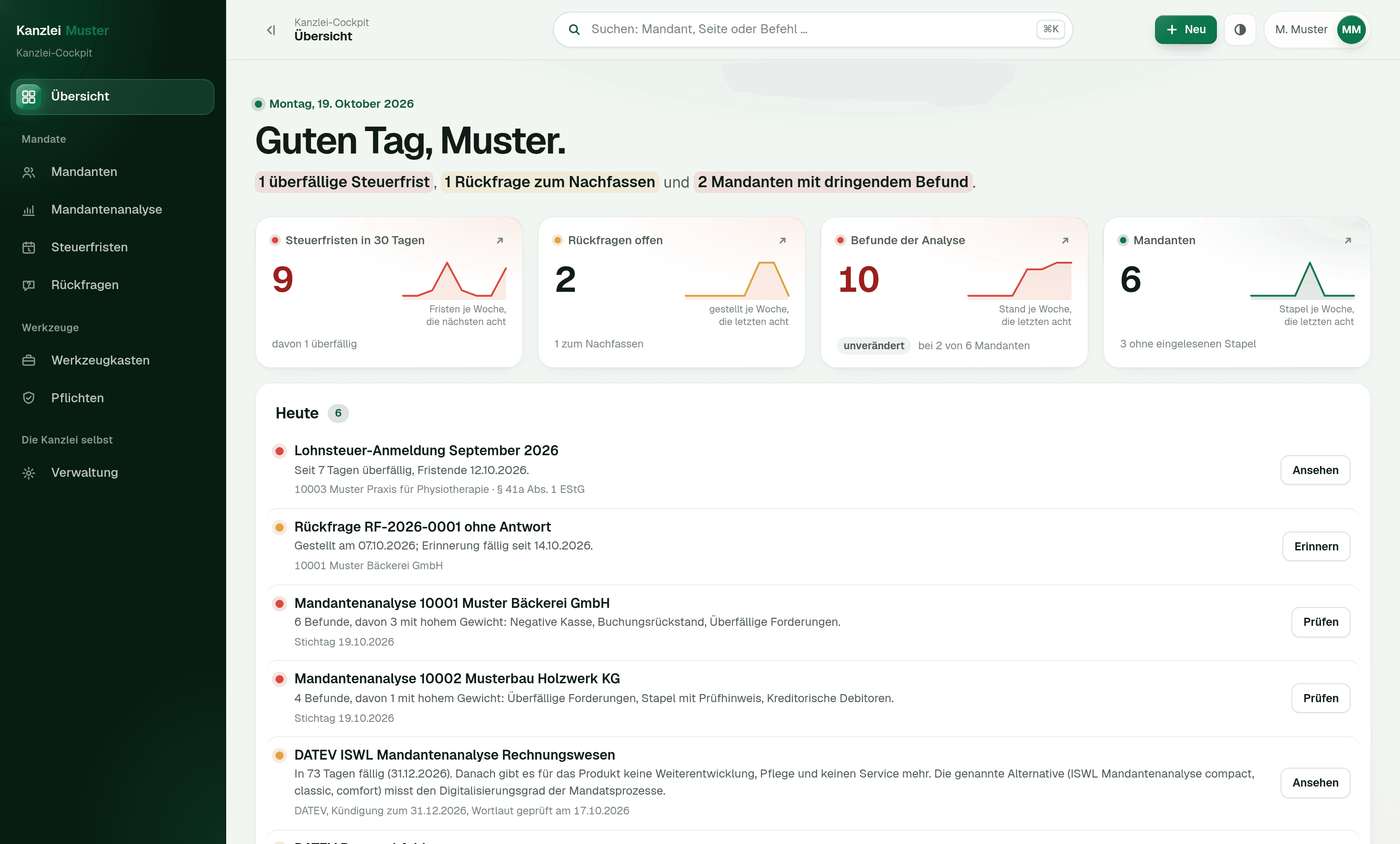
The Kanzlei-Cockpit is a browser application we built and that you can look at. It replaces neither DATEV nor your document storage. It sits next to them and turns booking batches, master data and tax assessments into the processes that used to fall between the programs: the analysis of each client's books, the tax deadlines with their calculation, the collected query to the client, the converted bank statement. Clients, people and amounts in the pictures are invented.
For your IT
Next.js, PostgreSQL and Docker, running in the firm's network or on your own server. The client analysis, the tax deadlines and the conversion of bank statements are pure computation without database and without network; each part has a test suite whose expectations were checked by hand. Client data does not leave the firm; the only exception is the query sent to the client's own address.
About these images
The screenshots come from a demo installation of the invented firm “Muster Steuerberatung” with six clients. Every client, person, address and amount shown is invented, and recognisably so: names are exclusively “Muster…” placeholders, addresses end in .example. The findings of the client analysis and the tax deadlines are not written into the demo data but calculated from the booking batches and master data.
We will demonstrate the application in 20 minutes, on invented data and with no obligation.
Book a demonstrationBuilt to fit
Built for your case, not off the shelf
We do not sell finished software. Every application you see on these pages was built for one single business, and it would look different at yours, because your workflows, your programs and your responsibilities are different. We build every solution around your use case, and the template for it is your business.
Your workflow sets the shape.
We reproduce the way you already work instead of teaching you the workflow of somebody else's software.
Your words, your forms.
Labels, fields, templates and printouts come from your house. Nobody has to learn what a generic screen is supposed to mean.
What you do not need, we do not build.
No feature set you pay for and nobody opens. The cut comes from your workflow, not from a price list.
Workflows
What we take over
Five workflows from daily practice. None of them touches professional judgement. That stays entirely with you.
Client post, documents and official correspondence separated
Every item is read, matched to the client and the matter, and filed into the right category: document, official correspondence, client request, deadline matter. Deadline matters are flagged and pulled to the top before anyone can overlook them.
Today
Five channels someone has to turn into one sorted stack every morning.
Afterwards
One inbox per category, every item already matched to a file.
Onboarding a matter without the form marathon
The new client's details produce the power of attorney, fee agreement, engagement terms and the created file, pre-filled and complete. Identity verification and filing of the evidence run as a guided workflow too.
Today
The same set of documents is assembled by hand for every new matter.
Afterwards
The complete set is pre-filled and ready for review and signature.
Deadlines nobody has to remember
Deadlines, filings and follow-ups are recognised in incoming post and created as records with both a preliminary and a final date. Preliminary dates announce themselves in time, open deadlines appear in the day list of the person responsible and of the partner.
Today
Deadline control depends on two people and their memory.
Afterwards
Every deadline has a record, a preliminary date and two people who can see it.
The client file that maintains itself
Documents are recognised, named, versioned and filed into the right structure. Yours, not somebody else's. Missing paperwork is tracked as an open item and followed up with the client.
Today
Filing on the principle of 'whoever creates it names it differently'.
Afterwards
A file structure that holds up even when a colleague is on holiday.
Practice software, accounting and client portal
Your practice application, the bookkeeping, your document filing and the client portal know the same clients and the same matters but never ask each other. We build the connections in between, without replacing any of those programs.
Today
The same client is maintained in three systems and forgotten in two.
Afterwards
One master record, current everywhere. A query is answered at a glance.
More workflows
Everything that runs alongside the matter
The workflows above cost the most time. Alongside them, every firm runs a list of smaller routines that come back just as reliably every week. We automate them to the same pattern: the work is prepared, you approve it.
Post and deadlines
- Inbox from every channel
- Mail, client portal, paper, messenger and DATEV run into one basket. Every item gets a client, a type and an owner before anyone opens it.
- Deadline with early warning
- The deadline is calculated from the statute, with an early warning date and an owner. The calculation sits next to it, to be checked rather than trusted.
- Deadline calendar
- Every deadline in the firm in one view, filtered by owner. Someone on holiday still leaves no deadline unattended.
- Follow-ups
- Whatever has to be back on the desk in two weeks reports for itself, with the matter and the state of play today.
File and filing
- Client file
- Master data, powers of attorney, documents and open points in one place. The file says what is missing, instead of it surfacing at the meeting.
- Filing with readable names
- Every document lands in that client's folder, named to the same pattern, whether it comes from mail, the scanner or the portal.
- Requesting missing documents
- One request per client instead of one per document, with a list and a date. Chasing happens without anyone keeping it in a calendar.
- Master data from DATEV
- As a file, through DATEVconnect inside the firm network, or through a gateway when DATEV runs in the data centre. DATEV keeps them, the cockpit reads them.
Approval, knowledge, figures
- Approval by a second pair of eyes
- Nothing leaves the building without approval. Who saw and released what is in the log, and that log is the evidence § 203 asks for.
- Pseudonymised before analysis
- Original and redacted version sit side by side, every replaced passage marked. Only after your approval does the redacted version go out.
- Look it up instead of asking
- Your own pleadings, notes and instructions are searchable, with the source. Without the cloud if you want it, on a machine in the firm.
- Reports
- Open deadlines, arrears, workload per owner. Every figure is also a filter: one click leads into the list behind it.
This is not a list to tick off and not a package you order. Hardly any business needs all of it, and nobody starts with everything: we take the two or three workflows that cost you the most time, the rest comes later or not at all.
Approvals
Confidentiality, data and approvals
For professional firms, where the data sits matters more than any time saved. Which is why it is the first point in the project and not the last.
- On request the language models run entirely in your own infrastructure. No client data leaves your building.
- Nothing reaches clients, courts or authorities without your approval. The system prepares, you sign.
- We provide a data processing agreement and document who could access what, and when.
- Professional and legal judgement on any matter stays entirely with you. We automate administrative routes, not the work on a matter.
- At the end of a project you get your data out and we delete it verifiably.
Your own software
When your practice software ships the AI with it
Since May 2026 DATEV Copilot has been available without licence fees. It drafts text, translates and summarises long documents; it does not analyse structured data such as the BWA management report, and processing runs in the DATEV cloud. From autumn 2026 DATEV starts moving its programs to the cloud. Here is when that is enough, and when it is not.
Then it is enough
- A document needs summarising or searching, and a person reads the result anyway.
- Your post arrives through practically one channel.
- Deadlines sit with one person who has them firmly in hand, and the advance warnings are in the calendar.
- You do not need any analysis of how cases move through the practice.
Then it is not
- A deadline has to be calculated rather than read off the assessment: four days of deemed service under section 122 (2) no. 1 AO, one month under section 355 AO, deferral to the next working day under section 108 (3) AO, with the working shown alongside.
- Post arrives through five channels (email, client portal, paper, messenger, DATEV) and has to come together in one inbox.
- Whatever is not recognised with certainty has to land in an “unclear” basket rather than somewhere. A module that always produces an answer is the problem here, not the solution.
- Section 203 StGB is the line: client data does not leave the house, or only pseudonymised and after visible sign-off. A module whose processing you cannot switch off does not help you there.
- DATEV has to stay authoritative for master data and be read only. No module that wants to write back can do that.
If this list leaves you with the module your software already ships, that is a good outcome: you just saved yourself a purchase. The free check answers exactly this question in 45 minutes, before anyone writes a quote.
Objections
What you are asking yourself now
- Do we have to switch software?
- No. We replace nothing. Your practice software, your document filing and your deadline register stay exactly where they are. We build the connection in between.
- We have nobody for IT.
- You do not need one. We set it up and we look after it. At your end it is operated by someone who used to operate Excel.
- What happens when the automation fails?
- Then the workflow carries on as before, by hand. We build nothing whose failure brings your practice to a halt.
- Does our data go into a cloud?
- Only if you want it to. Otherwise everything runs on a machine in your own office or on a server of your own.
- And if it does not pay off for us?
- Then we say so in the check, before any quote. That is why the check is free.
Effort & timeline
One workflow, a few weeks
We start with one workflow, not with your practice software. Which one follows from the free check. For professional firms we settle where the models run and what data they may see at all before a single line of code is written. Once that is settled, the first workflow goes live four to six weeks after you give the go-ahead.
Let's talk about your data first, then about the workflow.
45 minutes, free of charge, by video or at your firm. We establish which workflow pays off and under what conditions it is acceptable given your professional obligations. With or without working together afterwards.
Further reading
If you want to go deeper
- ServiceOffline LLMsLanguage models that never leave your building. Relevant wherever § 203 StGB applies.
- ServiceDocument intelligenceHow post from five channels gets matched to the right file.
- ArticleFive law and tax firm workflows you can automateThe five workflows on this page in full, including where the models are allowed to run.