


AI automation for
Restaurants & cafés
Every site in one application, through to the tax adviser
Till, mailbox, rota and bank account all know the same sites, but not each other. We connect them into finished workflows, from the supplier invoice to the booking at your tax adviser and from the clock-in to the hours sheet for payroll. Each morning the overview says in one sentence what is due: overdue invoices, documents to check, findings from the till check, open obligations towards staff. Your till stays, and so does your tax adviser.
That means restaurants, cafés, bars, bistros and takeaways, with one site or several, including delivery through the platforms. Even if every site has its own till, its own bank account and its own tax number, everything sits in one application, and the figures stay separate per site.
Invoices booked with their image for DATEV
Read, checked and sent to the tax adviser as a booking batch, the image via DATEV Upload Mail to Unternehmen online.
Hours sheet under § 3b EStG for payroll
Night, Sunday and public holiday hours, minute by minute from the clocked times, as a file for DATEV LODAS or Lohn und Gehalt.
Till checked before the tax inspector looks
VAT rate per product group, gap-free Z numbers, voids and cash differences, every finding with its working.
Applications we connect
- Tills with DSFinV-K export
- orderbird
- gastronovi
- Lightspeed
- ready2order
- Vectron
- Hypersoft
- DATEV
- DATEV Unternehmen online
- DATEV LODAS
- DATEV Lohn und Gehalt
- Lexware buchhaltung
- Bank statements and SEPA files
- Microsoft 365
- Nextcloud
- E-invoices (XRechnung, ZUGFeRD)
Where an application has an interface we use it, otherwise the files it already produces. Yours is missing? Ask us. Product names are trademarks of their owners; we are not a partner of any of these vendors.
Credentials you enter in the application are stored encrypted (AES-256) and never shown in plain text again. The application, its credentials and your data stay on a computer in your office or on your own server.
From the workshop
A finished application, not a concept paper
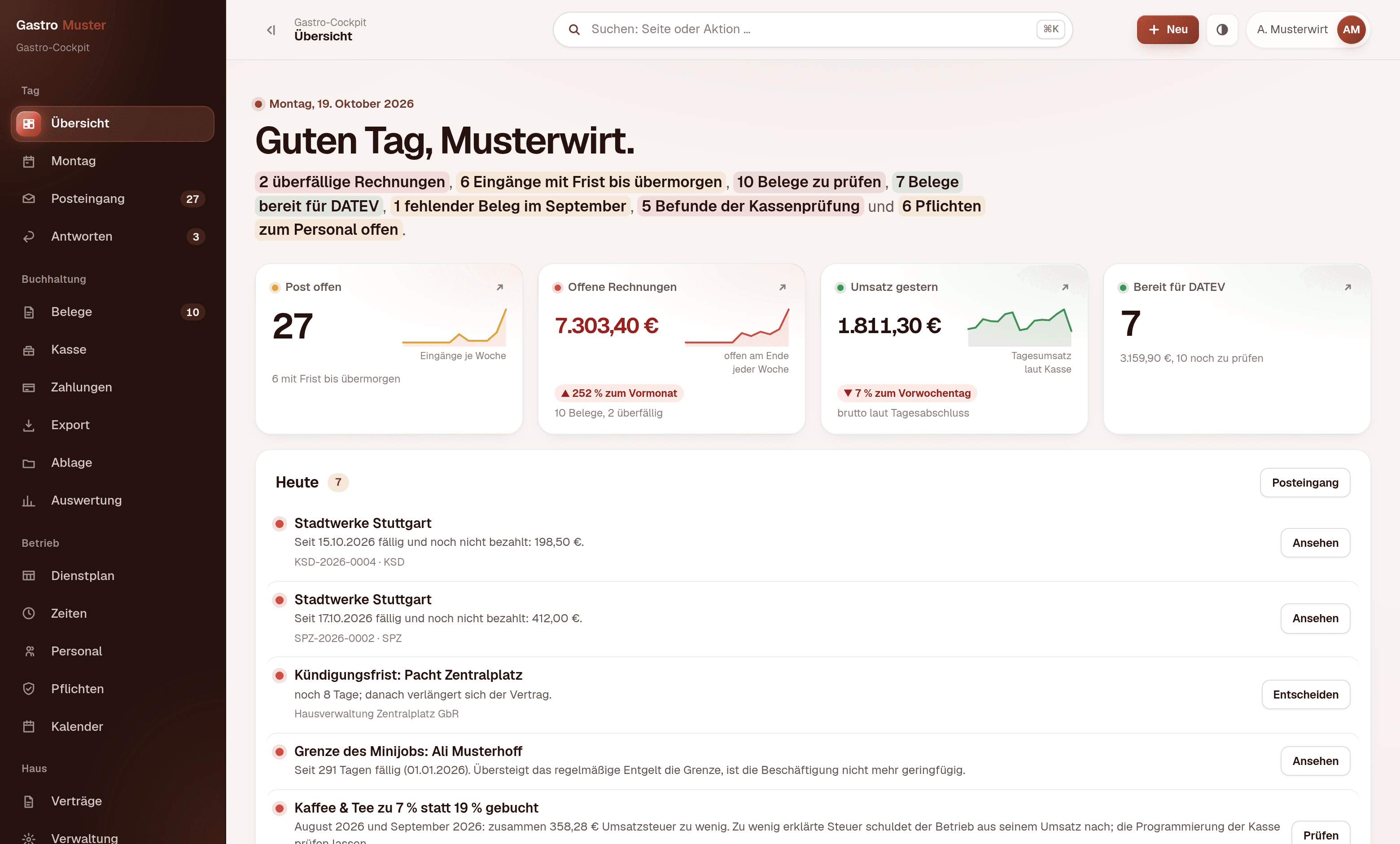
The Gastro-Cockpit is a browser application we built and that you can look at. It replaces neither the till nor the rota software nor the tax adviser's bookkeeping. It sits in front of them and turns post, till export, clock times and bank statement into the processes that used to fall between the programs: the read receipt with a booking proposal, the self-check of the till, the hours list for the payroll office, the matched payment. Outlets, people and amounts in the pictures are invented.
For your IT
Next.js, PostgreSQL and Docker, running in your network or on your own server. The till check, the split of hours under § 3b EStG, payment matching and the inbox rule set are pure computation without database and without network; each part has a test suite whose expectations were checked by hand. From the till the application takes totals, no receipts with staff or guests.
About the screenshots
The screenshots come from a demo installation of the invented business “Gastro Muster” with four outlets. Every outlet, person, address and amount shown is invented, and recognisably so: surnames are exclusively “Muster…” placeholders. The suppliers carry the names of real wholesalers and utilities, because receipt recognition depends on their senders. The classifications in the inbox and the findings of the till check are not written into the demo data but calculated.
We will demonstrate the application in 20 minutes, on invented data and without obligation.
Arrange a demonstrationBuilt to fit
Built for your case, not off the shelf
We do not sell finished software. Every application you see on these pages was built for one single business, and it would look different at yours, because your workflows, your programs and your responsibilities are different. We build every solution around your use case, and the template for it is your business.
Your workflow sets the shape.
We reproduce the way you already work instead of teaching you the workflow of somebody else's software.
Your words, your forms.
Labels, fields, templates and printouts come from your house. Nobody has to learn what a generic screen is supposed to mean.
What you do not need, we do not build.
No feature set you pay for and nobody opens. The cut comes from your workflow, not from a price list.
Workflows
What we take over
Five workflows that come back every week in every restaurant business, at every site. We start with one of them, not with all five.
From supplier invoice to booking with the invoice image
The post of every site is sorted by basket and site, and every invoice email becomes a draft document. Invoice number, date, payment terms, amounts per VAT rate and the supplier are read from the e-invoice, the PDF or the scan. A wholesale invoice with 7 and 19 per cent is split across two accounts. Arithmetic errors, missing mandatory details and duplicates are reported, and whatever is not beyond doubt stays empty. Checked documents go out as a DATEV booking batch or as an import file for Lexware buchhaltung, their images via DATEV Upload Mail to Unternehmen online.
Today
Invoices sit in several mailboxes and in one folder per site. At the end of the month the tax adviser asks for the missing ones.
Afterwards
Every document is read, checked and booked, its image is in DATEV, and the Monday overview says per site which one is still missing.
Check the till yourself, before anyone comes to look
The end-of-day reports come from your till's DSFinV-K export, the format every till with a TSE produces for the tax authorities. Every report is checked against its receipts and becomes the till batch for your tax adviser. The self-check over the last four months looks at what a cash inspection (Kassen-Nachschau) notices first: does every product group carry the right VAT rate, which since 1 January 2026 means 7 per cent on food and 19 per cent on drinks? Is the sequence of Z numbers per till without gaps? How are the void rate, cash differences and cash share developing per site and month? Every finding states its working and its source, and the audit report goes to the tax adviser as a PDF.
Today
Somebody looks at the Z report when the till does not add up. Whether every product group has carried the right rate since the switch to 7 per cent, mostly nobody checks.
Afterwards
Wrong VAT rates, missing Z numbers and clusters of voids are on a list before the tax office asks about them.
From clock-in to the hours sheet for payroll
Staff clock in with a PIN at a QR code on the counter, on their own phone and without an account. The rota is kept per site, planned and actual hours sit side by side, and the application warns under the Working Hours Act. At month end it splits the hours minute by minute into the categories of § 3b EStG, that is night, Sunday and public holiday with the holidays of your federal state, and produces the hours sheet as a file for DATEV LODAS or Lohn und Gehalt, otherwise as Excel. It also shows per employee whether the stored hourly rate meets the minimum wage of €14.60 from 1 January 2027, and for mini-jobs whether pay stays within the new limit of €633 a month.
Today
Timesheets are typed up at month end, night and Sunday hours counted by hand.
Afterwards
The payroll office gets a file in the format of its own program, every premium hour traceable.
Match payments, prepare transfers
The bank statement comes as a file from online banking (camt, MT940 or CSV); the application needs no access to your account. For each transaction it proposes the matching invoice and gives its reasons: invoice number in the reference, IBAN and name of the supplier, amount to the cent or with an early-payment discount, also for collective payments. With two equally good candidates it does not guess. Open, checked invoices go back to online banking as a transfer file, per site from that site's own business account and only to the IBAN stored with the supplier. If an invoice names different bank details, it stays out until that has been cleared up.
Today
At month end the bank statement lies next to the invoice folder, and somebody ticks it off line by line.
Afterwards
Safe matches are accepted with one click, the rest is listed with its reasons.
Contracts and deadlines of every site in one place
Lease, till leasing, electricity and gas, insurance, card terminal: every contract is held with its term, notice period and renewal. The last day for giving notice is calculated, which is why it is still right after a renewal. It sits on the calendar next to appointments and the deadlines from the post. On request the application syncs this with the business calendar, in Nextcloud or Microsoft 365, without anything confidential and without the names of staff.
Today
The notice period of the lease sits in a folder, and the contract renews without anybody noticing.
Afterwards
The last day for notice is on the calendar before it has passed, for every contract of every site.
Approvals
What stays with you
Nothing leaves the business without your approval: no reply to a guest or supplier, no transfer, no file to the tax adviser. The application prepares and puts the finished case in front of you. Whatever it does not recognise with confidence stays open instead of being guessed.
- Replies are built from your own text blocks and only go out after approval. For letters from the authorities there is deliberately no block.
- Transfers only ever go to the IBAN stored with the supplier, and they are released in your bank's online banking. The application has no access to your account.
- Your tax adviser has the last word: if they have rebooked a document, their booking applies, and the account assignment learns from it.
- Every role sees only its part. Site managers see their sites, the tax adviser reads along, changes nothing and sees no staff data.
Your own software
When your programs already do a lot
It is a fair question what you still need us for. Tills ring up orders, close the day, produce reports and the DSFinV-K export for inspections, and some connect the delivery platforms too. Booking systems take reservations, even in the middle of service, rota programs plan shifts and record hours, and DATEV Unternehmen online carries the documents to the tax adviser. Each of these programs sees its own part. Here is when that is enough and when it is not.
Then it is enough
- You run one site, and the end-of-day report of your till is your overview.
- Your tax adviser collects documents and till data themselves and rarely asks for anything.
- Your rota program calculates the premiums, and the payroll office is happy with its export.
- The product groups of your till have been checked since the switch on 1 January 2026, and new items are rarely added.
Then it is not
- Several sites with their own till, own account and own tax number should be in one overview, without the figures of one site ending up in another's.
- Whether every product group carries the right VAT rate, food at 7 per cent and drinks at 19 per cent, should be checked every month, not only at the inspection.
- A gap in the Z numbers should stand out while the missing export can still be fetched.
- Hours should reach the payroll office split under § 3b EStG, minute by minute and with the holidays of your federal state, even when a shift runs past midnight.
- Documents, till and bank statement should come together: which invoice is paid, which is missing and which suddenly names a different IBAN.
- We replace nothing: till, reservations and delivery platforms stay as they are, and DATEV stays with your tax adviser.
If this list leaves you with the module your software already ships, that is a good outcome: you just saved yourself a purchase. The free check answers exactly this question in 45 minutes, before anyone writes a quote.
Objections
What you are asking yourself now
- Do we have to change our till?
- No. The application reads the DSFinV-K export your till produces anyway. Till, till supplier and tax adviser stay as they are. We build the connection in between.
- Does the till check replace the tax adviser or the cash inspection?
- No. It is a self-check, not a tax audit, and the audit report says so on every page. It shows what an inspection notices first, every finding with its working and its source; where no regulation names a figure, the thresholds are marked as our own house convention. What follows from it, you decide with your tax adviser.
- We have nobody for IT.
- You do not need anyone. We set it up and look after it. It runs in the browser, and staff clock in at the counter on their own phone.
- Does our data go into a cloud?
- Only if you want it to. Otherwise everything runs on a machine in your business or on your own server. From the till the application takes totals, not receipts with staff or guests on them.
- And if it does not pay off for us?
- Then we say so in the check, before any quote. That is why the check is free.
Effort & timeline
One workflow, not every site at once
We start with one workflow. Which one comes out of the free check: the workflow with the highest repetition and the largest share of standard cases. The first workflow runs four to six weeks after your go-ahead, six rather than four if your programs have no interface and we work through the files they already produce. What comes next is your decision, once you have seen that it works.
Let us cost out one month of invoices together.
45 minutes, free, by video or at your premises. You name a workflow that comes back every month: invoices, till or hours sheet. We record how often it occurs, how many minutes it costs and how much of it is the same every time. With or without working together afterwards.
Further reading
If you want to go deeper
- ServiceDocument intelligenceHow supplier invoices, PDFs and scans become checked documents, every value with its place in the original.
- ServiceAI agents & automationWhat can run by itself between intake, check and approval, and where the application waits for you.
- Worked exampleHow we cost out a workflowUsing a damage report as the example: step by step in hours, with the assumptions in the open.