


AI automation for
Service & maintenance companies
Job, callout, inspection report, without a second shift in the office
The technical work in the field runs smoothly. The back office is the one playing catch-up. At every handover between enquiry, scheduling and documentation there is a person carrying information from one system into the next. Those handovers are what we rebuild.
That means companies in plumbing and heating, refrigeration and air conditioning, lift and door technology, fire protection, electrical work and machine servicing. Equally with cleaning and facility contractors, security services, medical equipment servicing and solar specialists.
One visit per customer
A customer's devices that fall due are bundled into one appointment, always on the earliest due date.
Inspection intervals with reasons
Worked out from your own failure rate, line by line against DGUV Regulation 3.
Lexware stays
We connect instead of replacing: Lexware, inspection software and inventory stay where they are.
Applications we connect
- Lexware Office
- DATEV
- Microsoft 365
- sevDesk
- TopKontor
- Label
- MOS'aik
- Streit V.1
- HERO
- Craftnote
- ToolTime
- Lexware buchhaltung
- Bank statements and SEPA files
- Nextcloud
- GAEB files
- E-invoices (XRechnung, ZUGFeRD)
Where an application has an interface we use it, otherwise the files it already produces. Yours is missing? Ask us. Product names are trademarks of their owners; we are not a partner of any of these vendors.
Credentials you enter in the application are stored encrypted (AES-256) and never shown in plain text again. The application, its credentials and your data stay on a computer in your office or on your own server.
From the workshop
A finished application, not a concept paper
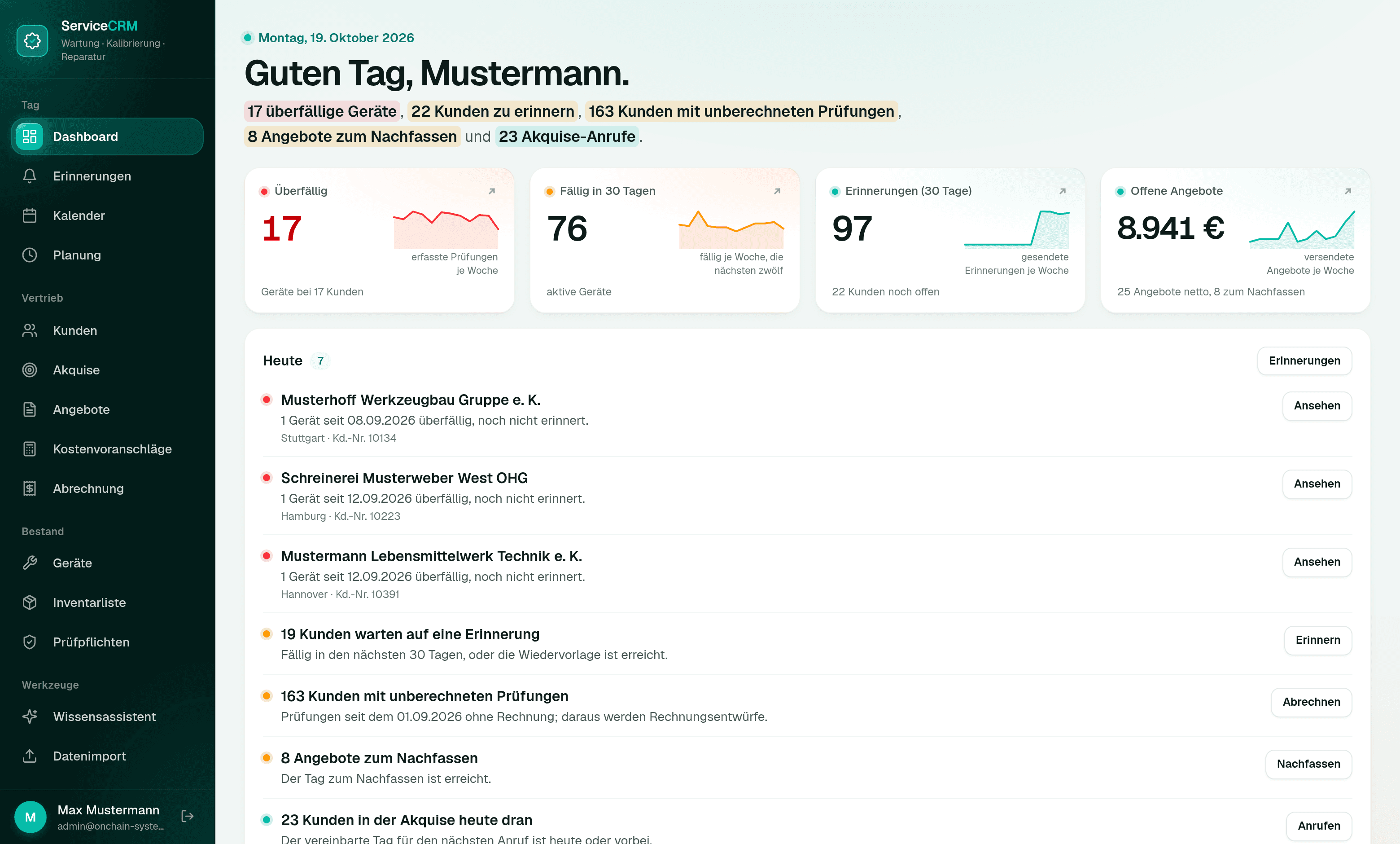
This workflow already exists, built for an inspection and maintenance company with twelve engineers. The application knows which inspection falls due at which customer, reminds the customer on its own and follows the reply through to the appointment. What has been inspected it bills from the company's own price list: as an import file for Lexware and as a direct debit for online banking. Before, those details sat in four programs that knew nothing about each other. We replaced none of them.
For your IT
Next.js, PostgreSQL and Docker, running inside your network or on your own server. Connected through the interfaces the existing programs offer, otherwise through the files they export anyway (Excel, PDF). Open formats, no lock-in to any vendor.
About these images
The screenshots come from a demo installation. Every company, person, device and appointment shown in them is invented. We do not show real customer data, not even on request.
We will walk you through the application in 20 minutes, on invented data and without obligation.
Book a walkthroughBuilt to fit
Built for your case, not off the shelf
We do not sell finished software. Every application you see on these pages was built for one single business, and it would look different at yours, because your workflows, your programs and your responsibilities are different. We build every solution around your use case, and the template for it is your business.
Your workflow sets the shape.
We reproduce the way you already work instead of teaching you the workflow of somebody else's software.
Your words, your forms.
Labels, fields, templates and printouts come from your house. Nobody has to learn what a generic screen is supposed to mean.
What you do not need, we do not build.
No feature set you pay for and nobody opens. The cut comes from your workflow, not from a price list.
Workflows
What we take over
Five workflows that repeat every week in a service company. We start with one of them, not with all five.
Devices due per customer in one visit
Assets, inspection deadlines and contract intervals live in one place. When several devices fall due at one customer, the application combines them into one appointment, on the earliest due date, because inspecting early is allowed and late is not. Reminders go out per customer instead of per device, until the date is booked. The inspection interval comes from your own failure rate, with the working under DGUV Regulation 3.
Today
A spreadsheet per device that one person maintains. The same customer gets three dates and three visits.
Afterwards
One visit per customer, and every inspection interval has its reason.
Enquiries become jobs
Every incoming enquiry is read, matched to the customer and the asset, and filed as a record: fault, maintenance, quote or query. Urgent items move to the top, the rest goes into scheduling. The sender immediately receives an acknowledgement with a reference number.
Today
A shared inbox that has to be sorted before anyone can start working.
Afterwards
Four lists by urgency, each entry with customer, asset and history.
From enquiry to quote
Enquiry text, asset history and your price lists become a draft quote with line items, travel and hourly rates. You review, correct and approve. The quote goes out the same day, not two days later.
Today
Two days pass between enquiry and quote in which nothing happens.
Afterwards
The draft exists as soon as the enquiry is in the system. Approval is one click.
The inspection report writes itself
The technician dictates or ticks off on their phone what they did. That becomes the finished report in the right template, with photos, readings and signature. The customer has it long before the next visit.
Today
Documentation happens in the evening, in the office, from memory.
Afterwards
The report is finished before the technician drives off the site.
Calendar, inventory and invoicing talk to each other
Scheduling, inventory, time tracking and your invoicing program hold the same data but never ask each other. We build the connections in between. Where your programs provide a route for that, we take it. Where they do not, we take the same path an employee would.
Today
The same job number is typed by hand in three different places.
Afterwards
Captured once, available everywhere. The invoice knows the callout.
More workflows
Everything that runs alongside the job
The workflows above cost the most time. Alongside them, every service business runs a list of smaller routines that come back just as reliably every week. We automate them to the same pattern: the work is prepared, you approve it.
Customers and equipment
- Equipment file
- Which unit sits where, when it was last inspected and what came up. The history hangs on the unit, not in an email from the year before last.
- Customer file
- Installations, contacts, contracts and open jobs for one customer in one place, instead of spread across ERP, mail folders and calendar.
- Inspection intervals
- The next date follows from the last inspection and the interval. What falls due is on the list before the customer calls.
- Data migration
- Inventory lists, grown folder trees and exports from the old program are read in, reconciled and checked for gaps. What goes wrong can be undone.
Appointments and messages
- Reminders
- One mail per customer instead of one per unit, with every due inspection in a table. You approve the text, it goes out afterwards.
- Following up replies
- Whoever does not answer gets chased. Whoever answers lands in scheduling with their preferred date, not in a mail folder.
- Scheduling
- Jobs, journeys and appointments in one view. If one moves, the engineer sees it on the phone and not the next morning.
- Unclear cases
- Anything that cannot be assigned without doubt goes on a pile and is not guessed. You decide once, the rule holds afterwards.
Documents and connections
- Report on the job
- The inspection report hangs on the job, on the unit and on the invoice. No searching a photo folder when the customer asks two years later.
- Filing with readable names
- Every document lands in that customer's folder, named to the same pattern, whether it comes from mail, the scanner or a phone.
- Connected to your programs
- Lexware, ERP, time tracking: the job arrives where the invoice is written. None of them is replaced.
- Look it up instead of asking
- Data sheets, standards and your own instructions are searchable, with the source. From the site as well.
This is not a list to tick off and not a package you order. Hardly any business needs all of it, and nobody starts with everything: we take the two or three workflows that cost you the most time, the rest comes later or not at all.
Approvals
What stays with you
Nothing leaves the building without your approval. No quote, no invoice, no customer message. The system prepares the work and puts the finished record in front of you. You decide.
- Quotes, invoices and customer messages only go out after approval.
- Every automated step is traceable: who, what, when, and on what basis.
- If the automation fails, the workflow continues exactly as before, just manually.
- Price lists, customer data and reports stay in your systems.
Your own software
When your trade software gains an AI feature
Trade and service applications bring AI along in 2026: a phone assistant answers calls, the daily report is dictated, the draft quote comes from earlier quotes. Most of it comes with the update or costs little. So the question of why you would still need us is a fair one. Here is the answer, in both directions.
Then it is enough
- It is about suggested wording for quotes and reports that somebody proofreads anyway.
- All of your data sits inside that one application.
- Due dates are held there reliably and the reminders go out from there.
- Your jobs run through a handful of technicians and the overview forms in conversation.
Then it is not
- Your records are scattered: addresses in the ERP, readings in the inspection software, maintenance as PDFs in a folder, receipts in accounting. A module only ever sees its own pot.
- Reminders have to go out per customer, not per device. Otherwise the same customer gets four emails in a week and calls in annoyed.
- The reply has to be tracked through to a booked inspection date, not just the email sent.
- The inspection interval should be extended with a stated reason where your own inspections allow it, line by line against DGUV Regulation 3.
- Import rows that cannot be matched with certainty belong in a list of their own instead of being guessed.
- We do not replace your applications, we connect them. Your accounting, inventory, inspection and time tracking software all stay where they are.
If this list leaves you with the module your software already ships, that is a good outcome: you just saved yourself a purchase. The free check answers exactly this question in 45 minutes, before anyone writes a quote.
Objections
What you are asking yourself now
- Do we have to switch software?
- No. We replace nothing. Your invoicing program, your trade software and your filing stay exactly where they are. We build the connection in between.
- We have nobody for IT.
- You do not need one. We set it up and we look after it. At your end it is operated by someone who used to operate Excel.
- What happens when the automation fails?
- Then the workflow carries on as before, by hand. We build nothing whose failure brings your operation to a halt.
- Does our data go into a cloud?
- Only if you want it to. Otherwise everything runs on a machine in your own building or on a server of your own.
- And if it does not pay off for us?
- Then we say so in the check, before any quote. That is why the check is free.
Effort & timeline
One workflow, a few weeks
We start with one workflow, not with your entire IT. Which one follows from the free check: the workflow with the highest repetition and the largest standard share. The first workflow goes live four to six weeks after you give the go-ahead, six rather than four when your applications have no interface and we work from the files they put out anyway. What comes after that is your decision, once you have seen it work.
Let's run the numbers on your most frequent workflow.
45 minutes, free of charge, by video or at your premises. You name a workflow you handle often. We record how often it occurs, how long it takes and how much of it is a standard case. With or without working together afterwards.
Further reading
If you want to go deeper
- Blog postSix office tasks a maintenance company can automateEach task described on its own, from the enquiry to the follow-up after the callout.
- ServiceDocument intelligenceHow inspection reports, delivery notes and timesheets become data you can work with.
- ServiceAI agents & automationWhat an agent handles in the background and where it waits for your approval.