


AI automation for
Property management
Building, owner, meeting, statement
We automate the workflows that repeat every week in your firm and leave the decisions with you. For managers where sorting work now takes more time than the actual management.
We also work with housing cooperatives, property managers, facility management companies and developers holding their own stock.
Your software stays
Post, bank, metering service and DATEV become finished workflows.
Every deadline with statute and working
Calculated, not copied, and every arrear carries its legal consequence.
Meetings without search nights
Deadlines, invitation, agenda and documents run as a single workflow.
Applications we connect
- casavi
- Microsoft 365
- DOMUS
- Karthago
- Immoware24
- Haufe PowerHaus
- Haufe axera
- Aareon Wodis
- Aareon GES
- Aareon iX-Haus
- facilioo
- etg24
- Win-CASA
- DATEV
- Bank statements and SEPA files
- Metering services (Techem, ista, Brunata Minol, Kalo)
- E-invoices (XRechnung, ZUGFeRD)
Where an application has an interface we use it, otherwise the files it already produces. Yours is missing? Ask us. Product names are trademarks of their owners; we are not a partner of any of these vendors.
Credentials you enter in the application are stored encrypted (AES-256) and never shown in plain text again. The application, its credentials and your data stay on a computer in your office or on your own server.
From the workshop
A finished application, not a concept paper
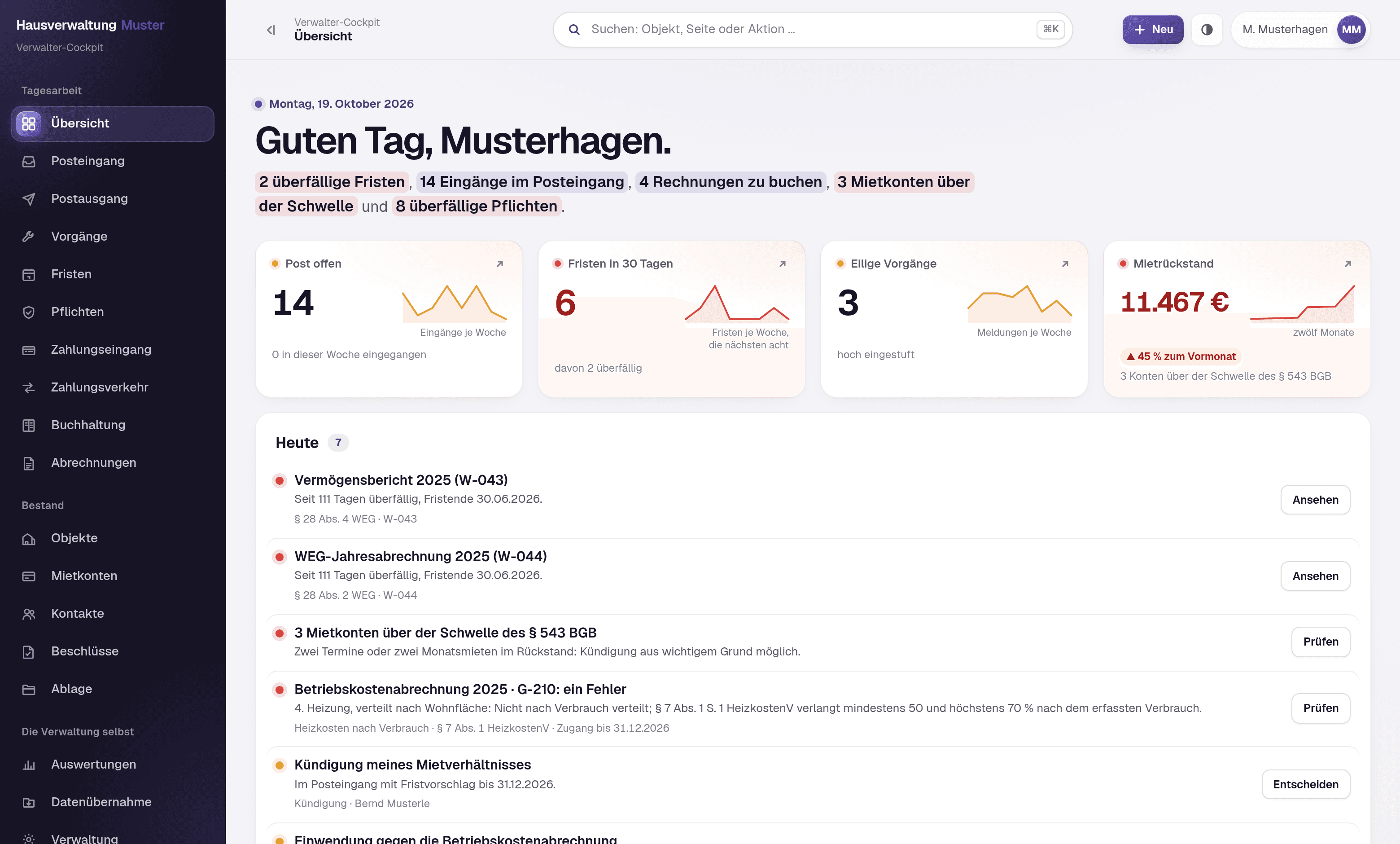
The Verwalter-Cockpit is a browser application we built and that you can look at. Before a service charge statement goes out, it checks it item by item, including one prepared by the previous manager. Post arrives sorted into one inbox, every deadline carries the statute it comes from, and the rent account states not only how much is outstanding but what legal consequence the arrears have. It replaces no property management software. Your master data stays where it is. The cockpit sits in front of it and produces the things that were in no program before: the checked statement, the duties per property, the calculated deadline, the collection of resolutions.
For your IT
Next.js, PostgreSQL and Docker, running in your network or on your own server. The statement check, the deadline calculation, the inbox rule set and the rent account check are pure computation without database and without network. That is why they can be tested individually, and each of these parts has a test suite whose expectations were checked by hand. The public holiday calendar is set to Baden-Württemberg: public holidays are a matter for the individual states, and with cut-off periods a roughly correct calendar is the worst of all states.
About the screenshots
The screenshots come from a demo installation of an invented “Hausverwaltung Muster”. Every property, tenant, address, amount and resolution shown is invented, and recognisably so: surnames are exclusively “Muster…” placeholders. We do not show real tenant data, not even on request. The classifications in the inbox and the findings of the statement check are not written into the demo data but computed: what appears in the picture is what the application produces.
We will demonstrate the application in 20 minutes, on invented data and without obligation.
Arrange a demonstrationBuilt to fit
Built for your case, not off the shelf
We do not sell finished software. Every application you see on these pages was built for one single business, and it would look different at yours, because your workflows, your programs and your responsibilities are different. We build every solution around your use case, and the template for it is your business.
Your workflow sets the shape.
We reproduce the way you already work instead of teaching you the workflow of somebody else's software.
Your words, your forms.
Labels, fields, templates and printouts come from your house. Nobody has to learn what a generic screen is supposed to mean.
What you do not need, we do not build.
No feature set you pay for and nobody opens. The cut comes from your workflow, not from a price list.
Workflows
What we take over
Five workflows that look the same in every management firm, regardless of which property software you run.
The inbox sorts itself
Every incoming message is read, matched to the building and unit, and assigned a category: damage, request, resolution query, contractor, change of ownership. Urgent items move to the top, the rest into the right list.
Today
Sixty unread emails that have to be sorted first.
Afterwards
Four lists by building and urgency instead of one inbox.
From damage report to contractor job
The report becomes a record with building, unit, description and photos. A suitable contractor is proposed, the job text is pre-drafted, and the reporter immediately receives an acknowledgement with a reference number. You approve, everything else runs.
Today
Every report passes through four pairs of hands before the contractor has the job.
Afterwards
The finished job waits for approval, and the reporter already knows it was received.
The owners' meeting prepares itself
Deadlines tracked, invitation generated, agenda compiled from the open items of the year, documents gathered, dispatch prepared. You review and approve.
Today
Three evenings spent gathering documents from four different filing systems.
Afterwards
Invitation, agenda and attachments ready for review.
Minutes and resolution register without rework
The minutes produce the entries for the resolution register, cleanly worded and matched to the building. Action items land in the system as tasks with deadlines.
Today
The action items live on a sticky note next to the monitor.
Afterwards
Every resolution recorded, every task with a date and a name attached.
The building file in one place
Property software, inbox, filing system and contractor correspondence do not talk to each other today. We build that connection so everything about a building sits together.
Today
Answering one query means searching in four programs.
Afterwards
A query is answered in seconds, with the supporting document.
More workflows
Everything else that runs alongside
The five above cost the most time. Alongside them, every management firm runs a long list of smaller workflows that come back just as reliably each week. We automate them the same way: the task is prepared, you approve it.
Tenancies
- Tenancy agreements
- The contract is generated from your template, filled with the data of the unit and the tenant. You review it and sign.
- Applicants and enquiries
- Enquiries about a flat are recorded, matched to the building and answered, rejections included. We do not rank applicants: who gets the flat is your decision, not a machine's.
- Move-in and move-out
- Notice, appointment, handover, keys and deposit hang on one record with dates instead of sitting on five separate notes.
- Handover protocol
- The protocol is filled in on the device, with meter readings and photos. Defects become records from it, and the readings are ready for the service charge statement.
- Meter readings
- Request the reading, send the reminder, record the value. Numbers that do not fit last year are flagged rather than accepted.
- Vacancies
- Empty units sit in a list with date, reason and time standing empty, and that list keeps itself.
- Stepped and index rents
- Adjustments report themselves when they fall due, with the amount calculated and the letter drafted from your template. Nothing goes out that you have not approved.
- Certificates
- Rent certificates, payment confirmations, landlord confirmations: generated from your master data instead of retyped every time.
Accounting and payments
- Payment matching
- Bank transactions are matched to rent accounts, recurring ones by your own rules. Anything ambiguous goes on a pile and is not guessed.
- Dunning
- Arrears surface as they arise. The dunning level is proposed and the letter prepared, and it is sent only once you approve.
- Service charge statements
- Receipts sorted, cost types assigned, allocation keys calculated, the deadline in view. You check the statement instead of assembling it.
- Incoming invoices
- Contractor and utility invoices are read, matched to the building and checked against the job before they reach you for payment.
- Rent ledger and arrears list
- Who owes what, since when and why: the list builds itself continuously instead of appearing only when an owner asks.
- Loans and reserves
- Interest and repayment schedules run along, withdrawals from the reserve are recorded and sit ready for the annual statement.
- Files for the tax adviser
- What is requested every year is ready and sorted: receipts, cost types and summaries in the agreed format. The closing work stays with your tax adviser.
Deadlines and messages
- Requests with a reference number
- Every report gets a number, a status and someone responsible. The reporter can see what is happening instead of calling to find out.
- Mailings and outgoing post
- Announcements, invitations and statements go to the right group of recipients, as a letter or as an email, from a template carrying your data.
- Appointments and reminders
- Viewing, meter reading, maintenance, callback: the date hangs on the record and not in the head of the colleague who is on holiday.
- Short notice when something fails
- Lift stuck, water shut off: the affected units receive a short message. You approve the wording, the recipient list comes from the building.
Documents and master data
- Filing with readable names
- Every document lands in the folder of its building, named to the same pattern, whether it came from email, the scanner or your cloud storage.
- Data migration
- When you change property software or take on a new portfolio, master data is transferred, reconciled and checked for gaps before anyone works with it.
- Owners and advisory boards
- Who has owned since when, which shares belong to a unit and who sits on the advisory board: one record that statements, invitations and the resolution register share.
This is not a checklist and not a package you order. Hardly any firm needs all of it, and nobody starts with everything: we take the two or three workflows that cost you the most time, and the rest follows later or not at all.
Approvals
What stays with you
Nothing leaves the building without your approval. No contractor job, no message to an owner, no payment. The system prepares the work and puts the finished record in front of you. For anything that costs money or creates a legal obligation, that applies twice over.
- Jobs, owner messages and payments only go out after approval.
- As a manager you handle third-party funds, which is why no automation touches payment processes without four-eyes approval.
- Every step is documented and traceable: who, what, when, and on what basis.
- Building data, owner registers and the resolution register stay in your systems.
Your own software
When your property management software does AI too
The question comes up in every second conversation, and it is a fair one. In 2026 casavi ships casavi AI, with features that answer calls, summarise cases, assign and forward them and commission contractors. Other vendors are building comparable features into their products. Here is when that is enough, and when it is not.
Then it is enough
- Calls get answered, transcribed and filed as a case instead of ending up on a sticky note.
- Filing against the property is enough for you, because your administrator knows the unit by heart anyway.
- You manage a manageable portfolio and the inbox is cleared in a morning.
- Everything that matters happens inside that one application, and paper barely features any more.
Then it is not
- Incoming items have to be matched to the unit and the party, not just the property. That takes your master data and a rule set that can justify its hits.
- Post arrives by email, portal, paper and telephone. A module that only knows its own channel does not sort the rest.
- Deadlines have to be calculated, not read off a letter: section 556 (3) BGB, section 573c BGB, section 24 (4) WEG, each with the working and the provision alongside it.
- A letter that complains about defects and terminates in passing has to run as a termination, because only the termination starts a clock. A general-purpose module does not know precedence rules like that.
- You want to read back why a case was filed the way it was, instead of trusting a percentage. Below the threshold the field should stay empty rather than be guessed.
If this list leaves you with the module your software already ships, that is a good outcome: you just saved yourself a purchase. The free check answers exactly this question in 45 minutes, before anyone writes a quote.
Objections
What you are asking yourself now
- Do we have to switch software?
- No. We replace nothing. Your management software, your bookkeeping and your filing stay exactly where they are. We build the connection in between.
- We have nobody for IT.
- You do not need one. We set it up and we look after it. At your end it is operated by someone who used to operate Excel.
- What happens when the automation fails?
- Then the workflow carries on as before, by hand. We build nothing whose failure brings your office to a halt.
- Does our data go into a cloud?
- Only if you want it to. Otherwise everything runs on a machine in your own office or on a server of your own.
- And if it does not pay off for us?
- Then we say so in the check, before any quote. That is why the check is free.
Effort & timeline
One workflow, not your whole firm
We start with one workflow. Which one follows from the free check. The first workflow goes live four to six weeks after you give the go-ahead, six rather than four when your applications have no interface and we work from the files they put out anyway. What comes after that is your decision, once you have seen it work.
Let's take one damage report and run the numbers.
45 minutes, free of charge, by video or at your office. We record how often the workflow occurs per month, how many minutes it costs and how much of it is identical every time. With or without working together afterwards.
Further reading
If you want to go deeper
- ServiceDocument intelligenceHow invoices, contracts and correspondence get matched to the right property.
- Worked exampleWhat one damage report costsThis exact workflow, costed out step by step, with the assumptions in the open.
- ArticleThe case that never closesWhere the time goes, how to count it in hours, and when building it is not worth the cost.